From README.md in the repository.
Intelligence at your cursor.




A privacy-first, local-first Windows assistant that appears around your
mouse cursor when you press a hotkey — translate, explain, summarize,
rewrite, ask AI, search, or pull text off the screen, without leaving
whatever you're already looking at.
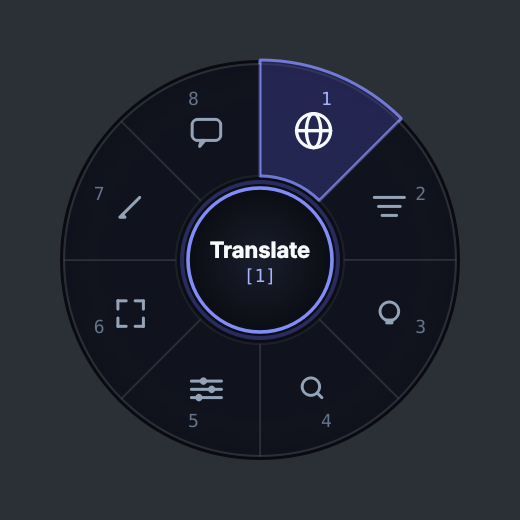
The radial menu widget from ui/radial_menu.py, rendered
offscreen by scripts/render_radial_preview.py. Fonts may differ
slightly from Windows.
Demo GIF: not yet captured. A recording of the full flow (hotkey →
menu → result panel) needs a Windows machine. The fastest way to see it is
to run it: Quick Start takes about two minutes on a machine
that already has Python.
Why
Every one of these actions already exists somewhere — a translator site, a
chat app, a search bar. What doesn't exist is one of them appearing exactly
where your mouse already is, the instant you ask for it, without a tab
switch, a paste, or an account. Select some text — a browser, a PDF, an IDE,
a chat window — press Ctrl+Alt+B, and a menu appears at your cursor. Pick
an action, and the answer opens right there.
Quick Start
python -m venv venv
venv\Scripts\activate
pip install -r requirements-core.txt
python main.py
Press Ctrl+Alt+B anywhere. That's the whole app — no account, no setup
wizard, no window to find. See SETUP_GUIDE.md for a full
fresh-machine walkthrough and how to add the optional engines (translation,
AI, OCR) behind each action.
Features
|
|
|
| 🌐 Translate |
Offline, via Argos Translate |
Working |
| 💡 Explain |
Local AI, via Ollama |
Working |
| 📑 Summarize |
Local AI, via Ollama |
Working |
| ✍️ Rewrite |
Local AI, via Ollama |
Working |
| 🤖 Ask AI |
Local AI, contextual or freeform |
Working |
| 📷 Capture Text (OCR) |
Local, via Tesseract |
Working |
| 🔍 Search Web |
DuckDuckGo — the one action that leaves your device |
Working |
| 🔊 Read Aloud |
— |
Planned, not built |
Also working: a customizable global hotkey (native RegisterHotKey /
WM_HOTKEY, no keyboard hooks), a cursor-anchored radial menu with full
mouse and keyboard navigation, multi-monitor and DPI-aware positioning,
clipboard-safe selection capture, a real Settings/Privacy/Check-Components
tray UI, and graceful degradation — every optional engine above is
independently optional, and a fresh install with none of them present still
starts and runs, disabling exactly the one action each is missing.
At startup, Cursor Bite performs zero network requests and initializes
zero optional components. Nothing is imported, probed, or connected to
until an action needs it.
Keyboard Reference
Once the radial menu is open:
| Key |
Action |
Ctrl+Alt+B |
Open Cursor Bite |
1 |
Translate |
2 |
Summarize |
3 |
Explain |
4 |
Search Web |
5 |
Settings |
6 |
Capture OCR |
7 |
Rewrite |
8 |
Ask AI |
| Arrow keys |
Move between sectors |
Enter / Space |
Activate the highlighted sector |
Esc |
Close / cancel |
See HOW_TO_USE.md for the full walkthrough.
Privacy Model
flowchart TD
    C[Selected text or screen capture] --> G[Privacy gateway scans for emails, API keys,<br/>tokens, card numbers, private IPs, credential pairs]
    G --> Q{Does the action<br/>leave the device?}
    Q -->|"No: Translate, Explain, Summarize,<br/>Rewrite, Ask AI, OCR"| L[Processed locally,<br/>sensitive or not]
    Q -->|Yes: Search Web| E{Sensitive<br/>data found?}
    E -->|No| S[Sent to DuckDuckGo]
    E -->|Yes| B[Blocked, or ask consent<br/>with a redacted preview]
- Local first. Translation, AI, and OCR all run on your machine.
Search is the only action that sends anything off it, and the app tells
you before it does.
- Sensitive data never leaves the device unintentionally. Detected
patterns never block local processing — the text is already on your
machine, and blocking it there would make the app useless for the
documents you most want help with. They do block, or require explicit
consent for, anything that would send them externally.
- Your clipboard is yours. Snapshotted and restored on every path,
including the ones where capture failed or was cancelled.
- No telemetry, no keylogging, no continuous screen or clipboard
monitoring. Capture only happens when you explicitly invoke it.
- No user content in the logs — action names, durations, and error
types, never your text, prompts, translations, or search queries.
The detector is regex-based and documented as a safety net, not a
guarantee — see SECURITY.md for its threat model and known
limitations.
Architecture
sequenceDiagram
    actor U as You
    participant H as Hotkey listener<br/>(RegisterHotKey)
    participant C as Controller<br/>(UI thread)
    participant W as Worker threads<br/>(capture, pipeline)
    participant G as Privacy gateway
    U->>H: Ctrl+Alt+B
    H->>C: show radial menu at cursor now
    C-)W: capture selection in parallel
    U->>C: pick an action
    C->>W: prepare()
    W->>G: evaluate(text, requires_external)
    G-->>W: allow / needs consent / block
    W-->>C: prepared request
    opt needs consent (Search Web with sensitive text)
        C->>U: consent dialog with redacted preview
        U-->>C: approve or decline
    end
    C->>W: execute()
    W-->>C: result
    C->>U: result panel near the cursor
Ports-and-adapters layering: ui/ and app/ depend on domain/
interfaces, infrastructure/ implements them, and domain/ depends on
nothing else. Providers resolve lazily and fail safe, which is what makes
the startup and degradation guarantees above hold — see
app/pipeline.py's _load() for the pattern.
The pipeline is split into prepare() (extract + privacy decision) and
execute() (do the work) specifically so a consent dialog has a seam to
sit in: it runs on the UI thread between the two phases, with the actual
work on either side running on a worker thread. Decline, and nothing had
run yet — nothing was sent.
cursor_bite/
├── app/              orchestration: controller, pipeline, event bus
├── domain/           interfaces + pure data, no infrastructure imports
├── infrastructure/
│   ├── ai/           Ollama
│   ├── ocr/          Tesseract
│   ├── os/           hotkey, cursor, clipboard, selection, screen capture
│   ├── privacy/      sensitive-data detector, policy engine, gateway
│   ├── search/       DuckDuckGo
│   ├── storage/      cache (in-memory); an unused-by-default SQLite option
│   └── translation/  Argos Translate
├── ui/               PyQt6: radial menu, result panel, dialogs, tray
├── config/           defaults + config.json loader
├── utils/            logging, the run_async threading helper
├── tests/            unit / integration / security
├── scripts/          dev utilities (README preview render)
└── design/           a browser-based UI/UX prototype — not the shipped app,
                       see design/web-prototype/README.md
Technology
Python 3.11+ · PyQt6 · pywin32 · Argos Translate (offline) · Ollama (local)
· Tesseract (offline) · DuckDuckGo (no API key). Every dependency is free —
no paid API, no required account, no mandatory cloud service.
Current Status
Working today, exercised by the test suite and by running the app:
hotkey, radial menu, tray, privacy gateway, all seven actions listed above,
Settings/Privacy/Check-Components windows, clipboard-safe capture,
graceful degradation of every optional engine.
Experimental: DuckDuckGo search depends on an HTML endpoint DuckDuckGo
doesn't officially support for automation; it can return a bot-check page
under load, which is reported plainly rather than silently retried forever.
Language auto-detection for translation uses a three-tier fallback (Unicode
script → statistical detection → a weak last-resort probe) that is
deliberately conservative about guessing a language with no real evidence —
see CHANGELOG.md for a bug this caught.
Planned, not built: Read Aloud (TTS) — the interface for it
(TTSProvider in domain/interfaces.py) exists, nothing implements it yet.
An installer/MSI beyond the current PyInstaller build. A packaged
.exe verified end-to-end (see PACKAGING.md for exactly
what has and hasn't been runtime-checked).
Roadmap
- Read Aloud via a local TTS engine.
- An MSI/installer instead of a copy-the-folder EXE build.
- Revisit the radial menu against a compact command-bar alternative with
real usage data — the interaction model isn't assumed to be final.
Limitations
- Windows only, by design.
- Selection capture uses a simulated Ctrl+C plus a clipboard snapshot —
there is no universal cross-application "get selection" API on Windows
without deeper accessibility integration. This works in the overwhelming
majority of apps; a handful of unusual ones (custom-rendered canvases with
no text layer, some elevated/protected windows) won't produce a selection
to copy. The app tells you plainly when nothing was captured rather than
guessing.
- Web search quality is bounded by an unofficial HTML endpoint — see
Current Status above.
- The sensitive-data detector is pattern-based, not exhaustive — see
SECURITY.md.
Development
pip install -r requirements.txt
pip install pytest ruff
python -m pytest tests/ -q
ruff check .
See CONTRIBUTING.md for the architectural conventions
(lazy/fail-safe providers, no UI-thread blocking, no user content in logs)
this project holds itself to.
Testing
python -m pytest tests/ -q
306 tests across privacy detection and policy, every pipeline action, the
clipboard save/restore invariant, selection-capture concurrency, the
hotkey string parser, multi-monitor cursor geometry, search rate limiting
and fallback tiers, graceful degradation when packages are missing, the
two-phase consent seam, and radial-menu keyboard/mouse navigation. Runs
headless — no display, network, Ollama, Tesseract, or Argos packs required
(one test additionally exercises a real installed Argos language pack when
one happens to be present, and degrades to its "not installed" branch
otherwise).
Packaging
pip install pyinstaller
pyinstaller cursor_bite.spec
See PACKAGING.md for what's bundled, what still needs to be
installed separately on the target machine, and what has and hasn't been
runtime-verified about the resulting build.
Security
See SECURITY.md for how to report a vulnerability. The
sensitive-data detector is regex-based and documented as a safety net, not
a guarantee — see infrastructure/privacy/detector.py for exactly which
patterns it covers.
Important product principle
This project stays deliberately small. Before adding anything, ask whether
it improves context, intelligence, speed, privacy, or reliability.
If not, it probably doesn't belong — a focused project is worth more than a
large one.
License
MIT — see LICENSE.
Built by Soham Panda
AI engineering • intelligent software • privacy-first systems